Facebook Marketplace meetup safety: 9 rules before you meet
You agreed on a price. Now the buyer wants your address, or wants you to drive across town to meet someone you know only as a first name and a profile photo. Most of these exchanges go fine. The ones that don't tend to fail in the same few ways, and every one of them is avoidable with a little preparation. Here are the nine rules we'd give a friend, in the order you'll need them.
Why the meetup is the risky part
A Marketplace sale has two moments where things go wrong. The first is online, where someone sends a fake payment screenshot or a check for too much money. The second is in person, where you hand over an item, or your home address, to someone you have never met. The two are connected. Almost every in-person problem starts with a profile that was not what it seemed.
The numbers are not small. In 2024 the FBI's Internet Crime Complaint Center received 49,572 reports of non-payment or non-delivery, the category that covers sales where one side never pays or never ships, with $785 million in reported losses (FBI IC3, 2024 Internet Crime Report). The Better Business Bureau says online purchase scams made up 30.3% of everything reported to its Scam Tracker in 2024, and 87.5% of the people who reported one lost money. The same report notes that people were more likely to lose money when the scam ran through social media (BBB Scam Tracker, 2024).
None of this means you should stop selling the old couch. It means the ordinary precautions matter, and that one newer precaution, confirming the person is real before you share an address, has earned a place on the list.
Before you agree to meet
1. Check the profile, and know what it can't tell you. Open the other person's profile. Meta's own guidance is to review the seller's profile and keep the conversation on Facebook. Look at how long the account has existed, whether it has Marketplace ratings, and whether the listing history makes sense. Then be honest about the limits. A profile photo can be copied from someone else, generated by an AI tool, or belong to a real account that was hacked last week. A convincing profile lowers the odds of a problem. It does not prove a person.
2. Stay in Messenger. Meta warns that off-platform links are used to collect card and bank details, and that being pushed to phone or email early on is a warning sign. A buyer who wants to "text instead" before you've agreed on anything is asking you to leave the one place where you can report them.
3. Never share a verification code. The oldest Marketplace scam still works. A "buyer" says they've been burned by fake listings and wants to verify you're a real person, so they text you a code and ask you to read it back. The code is a Google Voice verification code, and handing it over gives them a phone number tied to yours, which they use on the next victim. The FTC's wording is "That's a scam, every time." A real buyer never needs a code from you.
Where and when to meet
4. Public, busy, daylight. Never your home. Police departments give the same advice everywhere: a well-lit public place with people around, during the day. If the item is too big to move, bring it to the driveway or garage and keep the stranger out of the house. The San Mateo Police Department puts it plainly: don't let strangers into your home, and trade only during daytime hours.
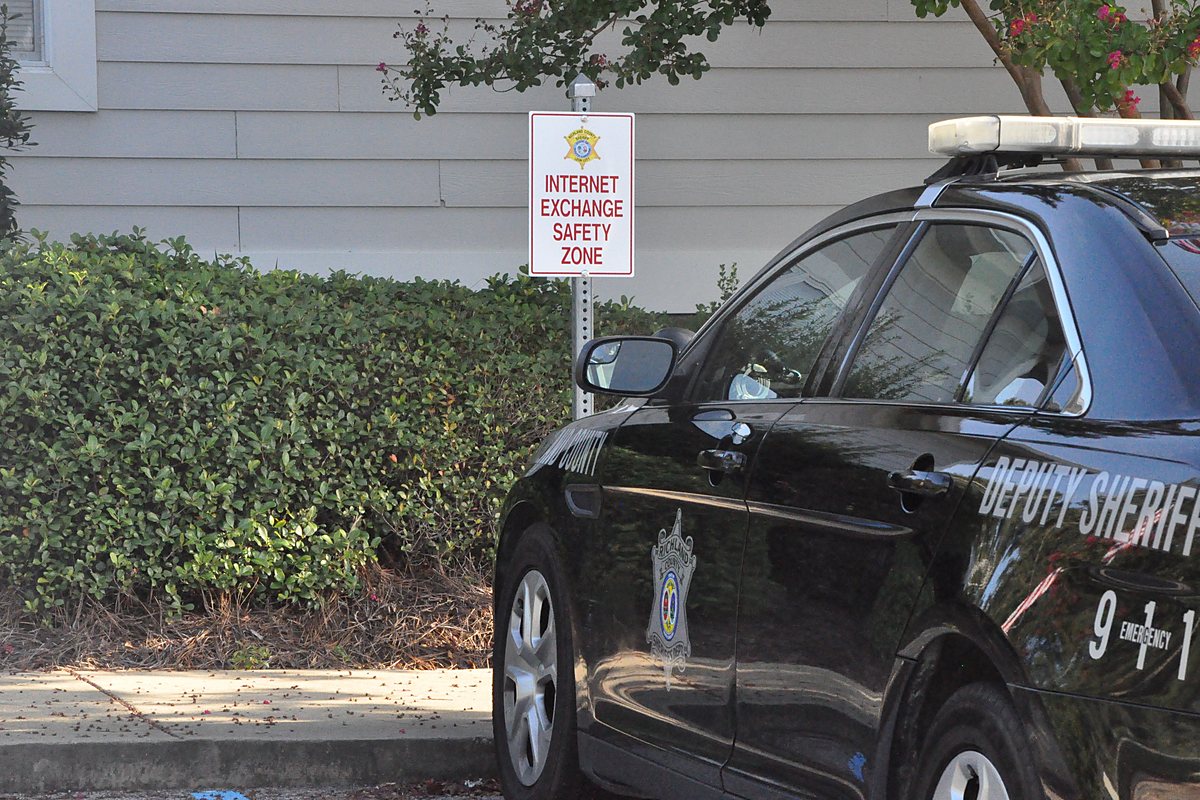
5. Use a police safe exchange zone. Many departments now mark a parking space or lobby entrance at the station for exactly this. San Mateo's is recorded by cameras 24 hours a day. Officers do not take part in the sale, and the city assumes no liability for what happens there, but a scammer who agreed to meet at a police station usually does not show up, which is the point. Search for your city's name plus "safe exchange zone", and check the hours before you suggest it.
6. Tell someone, and bring someone. Share the time, the place, the buyer's name, and what they said they'd be driving with a friend or family member. Bring a second person if you can. Keep your phone in your hand, not in the car. If the other person changes the location at the last minute, especially to somewhere less public, cancel. You lose a sale. They lose a mark.
How to get paid without getting scammed
7. Cash for local sales, confirmed on the spot. The FTC's advice for local sales is to meet in person and accept cash. Count it before you hand anything over. If you take a payment app instead, open your own app and look at your balance. Meta's guidance is the same: check your account to confirm the payment, even if they send you a screenshot. Screenshots are free to fake. The FTC goes further, "Don't accept a mobile payment from someone you don't know," which in practice means never ship or release anything on the strength of a notification.
8. Treat overpayment, gift cards, and "fees" as the end of the conversation. A buyer who "accidentally" sends too much and asks for the difference back. A check for more than the price. A request to pay with gift cards. A seller who wants a deposit before you've seen the item. Each one is on Meta's list of common Marketplace scams, and the FTC's rule covers the check version: "Never deposit a check for more than the selling price." There is no polite version of these requests. Stop replying and report the account.
Rule 9: confirm the person is real before you share an address
The eight rules above protect you from the transaction. This one protects you from the person. Before you give out an address or drive anywhere, ask the other party for a quick selfie, or a thirty-second video call. Most honest people shrug and do it. Someone running a copied or hacked profile usually goes quiet, which tells you what you needed to know.
A plain selfie has limits, though. It can be an old photo, a picture of someone else, or an image made by an AI tool, and you have no way to tell from your phone. That is the gap a cryptographically signed selfie closes. We built Authentk for this moment. The other person opens the app, takes one selfie, and their device signs it against a real-time challenge. You get a watermarked photo with the capture time and a verification link. Open the link or scan the QR code to see when it was taken, then upload the photo they sent you. You see "Photo Matches" if it is the signed original, or "Photo Does Not Match" if it was changed or swapped. You don't need the app to check, and checking costs you nothing. See what a verified photo looks like.
Be clear about what it proves and what it doesn't. A signed selfie shows the photo is real, was taken just now, and came from that person's device. It does not show their legal name, their age, or whether they actually have the cash. It belongs alongside the other eight rules, not in place of them. And if someone refuses every way of confirming who is coming, that is a reasonable moment to walk away.
Authentk proves a selfie is real: taken now, by that person, unedited. Free iPhone beta.
Join the iPhone betaWhat to actually type
Most people skip the safe options because asking feels awkward. It isn't, if you say it the same way every time. Copy these.
- Suggesting the station: "Happy to do $120. I use the safe exchange zone at the [city] police station on [street]. Cameras, easy parking. Does 5:30 today work?"
- Asking for a selfie: "Before I send my address, could you send a quick selfie? I do it for every sale, and I'll send one back."
- Declining a code: "I don't share verification codes. If you still want the item, the price and pickup spot are above."
- Holding the line on payment: "Cash at pickup only. I'll count it there and you can check the item before you pay."
The same routine works anywhere a stranger's photo is the only thing you have to go on. Related: How to tell if a dating profile photo is AI-generated and How to verify a roommate is real before paying a deposit.
Questions
Is it safe to meet a Facebook Marketplace buyer at my house?
Police departments advise against it. Meet in a busy public place in daylight, or at a police safe exchange zone. If an item is too large to move, bring it to the driveway or garage, have someone with you, and don't let the buyer inside.
What is the safest way to get paid on Facebook Marketplace?
For local sales, cash counted in person. If you accept a payment app, confirm the money in your own app before handing anything over, and never rely on a screenshot. Never deposit a check for more than the price, and never pay with or accept gift cards.
Why would a Marketplace buyer ask me for a verification code?
Because it is a scam. The code is usually for setting up a Google Voice number tied to your phone, which the scammer then uses on other people. The FTC's advice is to never share a verification code with someone you did not contact first.
How can I tell if a Marketplace buyer is a real person?
Profile age and ratings help but can be faked or hacked. Ask for a quick selfie or a short video call before sharing your address. A cryptographically signed selfie goes further: it proves the photo was taken just now on that person's device and has not been edited, and anyone can check it from a link without an app.
The short version
Most Marketplace meetups are a stranger handing you cash for a thing you no longer wanted. Keep it that way. Stay in Messenger, never share a code, meet somewhere public or at the station, confirm the money in your own hands or your own app, and confirm the person before you share an address. Nine rules, none of them hard. The whole routine adds about ten minutes to a sale and removes most of the ways it can go wrong.
Sources
- FBI Internet Crime Complaint Center, 2024 Internet Crime Report (crime-type tables: non-payment/non-delivery complaints and losses).
- Better Business Bureau, 2024 BBB Scam Tracker Risk Report, March 2025.
- Federal Trade Commission, Selling stuff online? Here's how to avoid a scam, July 2022.
- Federal Trade Commission, The Google Voice scam: how this verification code scam works, October 2021.
- Meta, Facebook Help Center: About scams on Facebook Marketplace and Buy and sell responsibly on Facebook Marketplace.
- San Mateo Police Department, Safe Exchange Zone.